

SAP GRC Access Control and Security
Understanding how users interact with SAP systems is essential for maintaining a secure and efficient access control environment. The Action Usage Report within SAP GRC provides critical insight into the transaction codes (T-codes) that users actively execute. This report enables organizations to make informed, data-driven decisions regarding role design and access governance.
What Is an SAP GRC Action Usage Report?
The Action Usage Report captures and displays T-code execution data for users, roles, or profiles over a defined period. Rather than relying on assumptions, this report provides real evidence of T-code usage.
Key benefits include:
- Enhancing role design through actual usage data
- Identifying and removing unnecessary access
- Supporting audit and compliance requirements
How to Run the SAP GRC Action Usage Report
1. Navigate to Reports and Analytics
Access the NetWeaver Business Client (NWBC) and select the 'Reports and Analytics' tab.

2. Access the Security Report
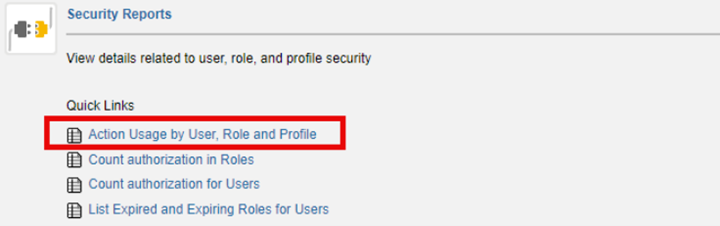
Within the 'Security Reports' section, select 'Action Usage by User, Role and Profile'.
3. Define Report Criteria
Specify the parameters for your report:
- Select one or more systems
- Define the Action Usage Date (single date or range using 'in between')
- Apply filters for users, roles, or groups as needed
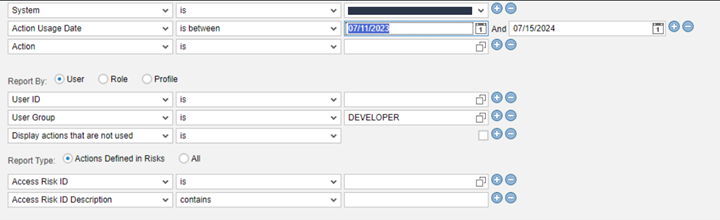
In this example, the report is gathering all actions used in a specific system, done in a specific time window, and done by a specific User Group
4. Choose Execution Method
For smaller datasets, execute the report in the foreground. For larger datasets, it is recommended to run the report in the background. When scheduling a background job, provide a name, define recurrence if applicable, and select execution timing.
5. Monitor Background Jobs
Navigate to 'Access Management' → 'Scheduling' → 'Background Jobs'. Locate your job, confirm the status is 'Finished', and select 'View Results'.
6. Analyze and Export Results
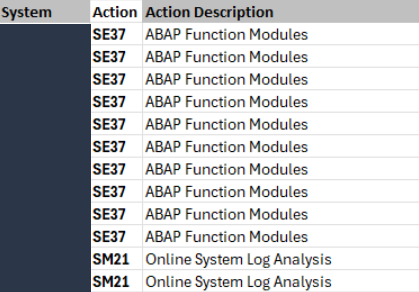
Review the report’s output within SAP or export the data to Excel for further analysis. The 'Action' column provides a comprehensive list of executed T-codes, offering insight into user activity patterns.
Business Value and Use Cases for SAP GRC Action Usage Report
The Action Usage Report is a valuable tool for improving SAP security, allowing you to:
- Optimize role design by aligning access with actual usage
- Strengthen compliance by providing auditable evidence
- Reduce security risk through removal of excessive access
- Gain visibility into user behavior across business functions
SAP GRC Action Usage Reports for Security and Compliance
SAP GRC Action Usage Reports are highly important to the security, compliance, and auditability of SAP systems. By leveraging Action Usage Reports, organizations can transition from assumption-based access management to a data-driven approach. Regular use of this report helps provide stronger governance, improved compliance posture, and more efficient role maintenance.
Author Tate Bullman